# Spec Data (LIMS)

Veeva LIMS *Spec Data* records contain information about what samples to collect, what tests to run, and what evaluation criteria is used to determine if what's tested is in or out of specification. Such criteria may be internal limits, specific to a market, or relate to a particular time point in a stability study. *Spec Data* records have associated *Spec Data Mapping* records, which match *Materials* and *Countries* to *Test Definition* records.

## About Spec Data Mapping & References in Veeva LIMS

* ***Spec Data Mapping*** records match the **Materials** and **Countries/ Organization** on a **Batch** to **Spec Data** records. During *Spec Execution*, Veeva LIMS uses the *Spec Data Mapping* records with a status of *Active* on a custom lifecycle state or with the standard *Active* lifecycle state.
* ***Spec Data*** records reference ***Sample Plans*** (and their ***Sample Definitions***, for use in **Sample Pull** actions) and contain ***Spec Data Criteria*** and ***Sample Actions***.
* ***Sample Actions*** reference ***Sample Definitions*** in the ***Sample Plan*** associated with the ***Spec Data*** record. ***Sample Actions*** can be of different types: **Pull Sample**, **Test Sample, Aliquoting Sample, Pool Sample**.
* **Spec Data Criteria** reference **Test Definitions and Results to Evaluate**.

When products are registered with a governing health authority, a specification is established to use for quality control. The specification defines what tests will be done and the expected outcome. Each batch of a product is then tested and compared to the criteria set forth in the specification. This is done on finished products for the purpose of releasing to market, but also on raw materials, excipients, or active product ingredients (APIs) for the purpose of releasing for use in manufacturing.

## About Spec Data Criteria

Each *Spec Data* contains a set of *Spec Data Criteria*, each targeting a specific *Test Definition Result* from a *Test Definition* in the selected lab protocol. The criteria defines the acceptable limits for the selected result, both descriptively and also as a formula.

*Spec Data* can be configured as *Control* specifications, providing early warning limits, or *Release* specifications, which would prevent batch release if failed.

## Spec Data Change Analysis

*Spec Data* records are under version control via Veeva LIMS *Change Analysis*. Once these records enter the *Effective* lifecycle state, they cannot be edited. Instead, you must create a new version using the **Create New Version** action on the record.

## Creating Spec Data

Before creating a *Spec Data* record, you should first have one or more *Test Definitions* and a *Sample Plan* in the *Effective* state type. You can create *Spec Data* using draft *Test Definitions* and *Sample Plans*, but you cannot approve it without first approving the draft *Test Definition*(s) and *Sample Plan*(s).

To create *Spec Data*:

1. From the *Spec Data* tab, select **Create**.
2. Choose **Batch Release Spec Data** or **Stability Study Spec Data** in the *Select Spec Data Type* drop-down.
3. Click **Continue**.
4. Enter a **Name**.
5. Select the **Sample Plan** that will be used for this Spec Data.
6. Click **Save**.

Vault validates that any calculated results are able to be completely calculated without cyclical references and populates the *Effective Date* field on the *Spec Data* when the record enters the *Effective* lifecycle state.

### Creating Spec Data Criteria

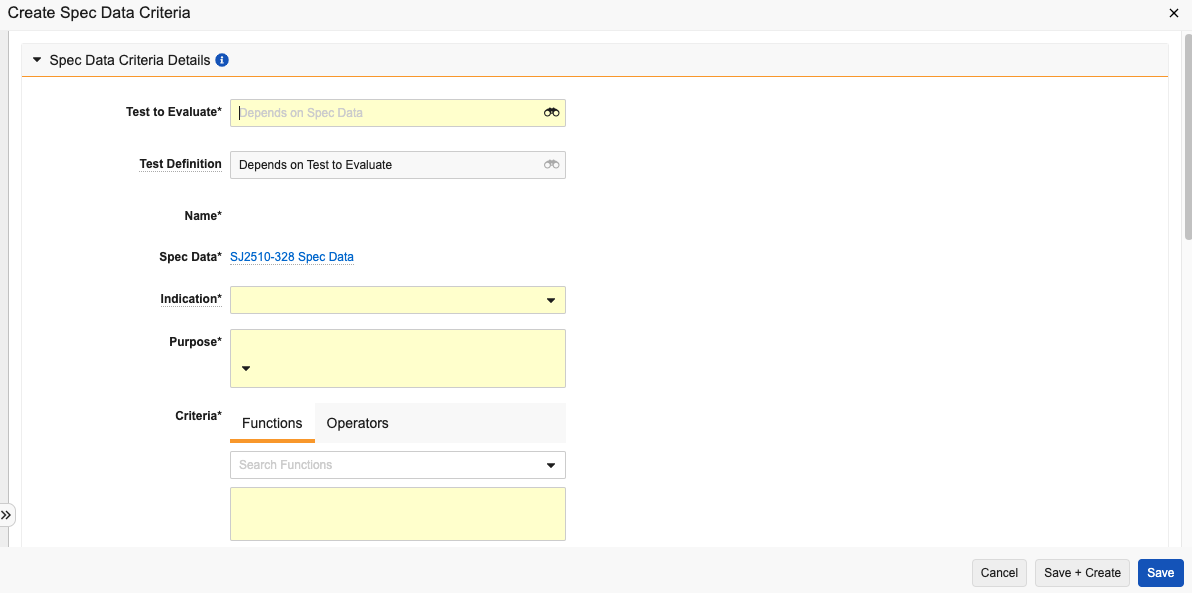
Each *Spec Data* record has one or more criteria which define the detailed data limits for the *Spec Data*. Vault creates *Lab Sample* records for each criteria during sample initiation.

To create these criteria:

1. In the *Criteria to Evaluate* section of a *Spec Data* record, click **Create**.
2. Select a **Test to Evaluate**. This automatically populates the *Test Definition* field.
3. Optional: Select a **Test Definition Variation** if applicable.
4. Select a **Result to Evaluate**. This automatically populates the *Result Object Type* and *Unit of Measure* fields. It also populates the *Variation Result Object Type* field if you selected a *Test Definition Variation*.
5. Enter a **Name**.
6. Select an **Indication**. This determines how the criteria is represented during test execution and whether failing the criteria prevents spec conformance.
7. Select a **Purpose**.
8. Define a [formula](/en/lr/42857/) in the **Criteria** field that controls data limits based around the `$result` token, for example: `$result < 0.5`
9. Enter a **Criteria Description**. This field serves as a human-readable explanation of the *Criteria* formula.
10. Select a **Spec Data Criteria Set**.
11. Click **Save**.

<a href="https://platform.veevavault.help/assets/images/LIMS-spec-data-criteria1.png" data-lightbox="images" data-title="" data-alt="Create Spec Data Criteria">
  <img class="docimage" src="https://platform.veevavault.help/assets/images/LIMS-spec-data-criteria1.png" alt="Create Spec Data Criteria" style="max-width: 400px;"  />
</a>

### Additional Steps for Stability Study Spec Data Using Quantity Tracking

When creating *Spec Data* for a *Stability Study* that uses Quantity Tracking, it is necessary to create *Spec Data Sample Actions* in order to track quantities. To create one or more *Spec Data Sample Actions,* complete the following additional steps:

1. On the *Spec Data*'s *Record Details* page, expand the **Inventory Action** section.
2. Click **Create**.
3. Enter a **Name**.
4. Select a **Sample Definition**.
5. Optional: Select a **Unit**. This will determine units for the *Planned Quantity* field.
6. Enter the **Planned Quantity**.
7. Click **Save**.
8. Repeat the above steps as necessary for any additional *Sample Actions*.

### Adding Planned Aliquoting to Spec Data {#planned-aliquot}

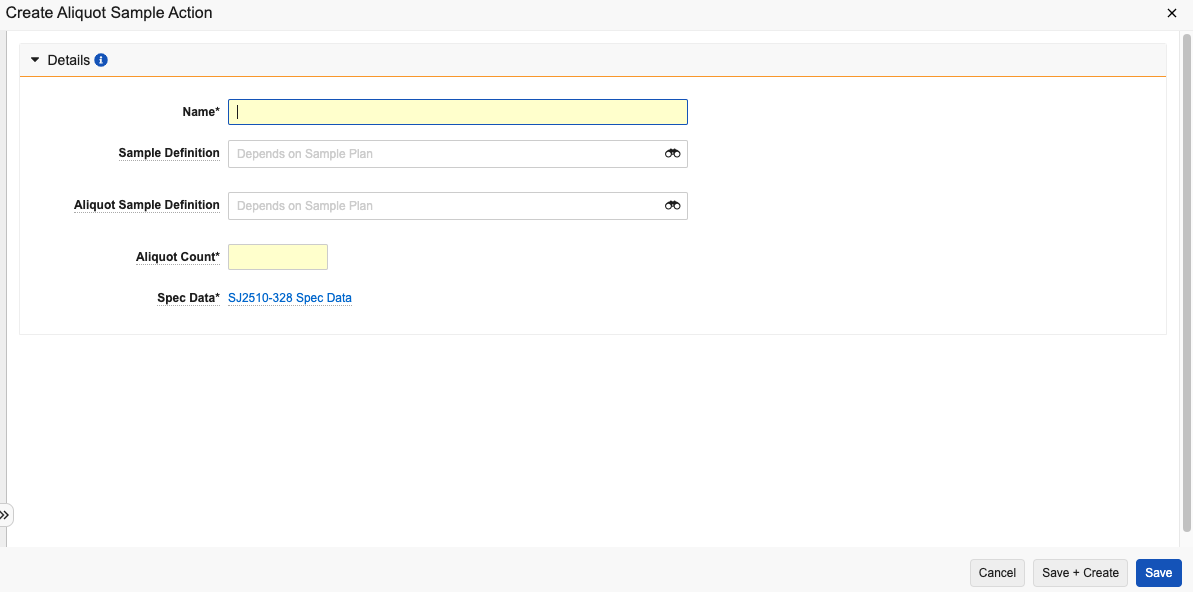
To add a Planned [Aliquot](/en/lr/51412709/) to *Spec Data*, you must first ensure that the associated *Sample Plan* includes at least two sample definitions: one sample that is collected, and one that will be generated via aliquot. Then, add the *Aliquot Action* to the *Spec Data* record. To do this:

1. In the *Aliquots Actions* section of a *Spec Data* record, select **Create**.
2. Enter a **Name**.
3. Select a **Sample Definition**. This represents the collected sample that should be pulled from storage to take the aliquot.
4. Select an **Aliquot Sample Definition**. This represents the sample(s) created via aliquot.
5. Enter an **Aliquot Count**.
6. Click **Save**.
<a href="https://platform.veevavault.help/assets/images/LIMS-aliquot-sample-action.png" data-lightbox="images" data-title="" data-alt="Aliquot Spec Data Action">
  <img class="docimage" src="https://platform.veevavault.help/assets/images/LIMS-aliquot-sample-action.png" alt="Aliquot Spec Data Action" style="max-width: 400px;"  />
</a>

<div class="note-border alert-info">
  <div class="alert alert-info" role="alert">
    <div><i class="far fa-info-circle"></i></div>
    <div class="alert-text">
      <p><strong>Note</strong>: Once a <em>Spec Data</em> record has been <em>Approved</em>, none of its standard fields can be edited, and standard relationships cannot be added or removed.</p>
    </div>
  </div>
</div>


## **Related Permissions**

To view and manage *Spec Data*, a user needs a permission set with *View* access to the *Criteria* field object control permission on the *Spec Data Criteria* object.
