Note: If the Batch Result version is different from the T0 Study Results, the Result Type and Units must match. Precision and other fields can differ.
## How to Use Batch Results for Stability Timepoint 0
In order to reuse *Batch Results* for a *Stability Study*'s *Timepoint 0*:
1. Navigate to the *Stability Spec Execution* record for the *Lab Study* to be initiated.
2. Select **Actions > Initiate Lab Study from Batch**.
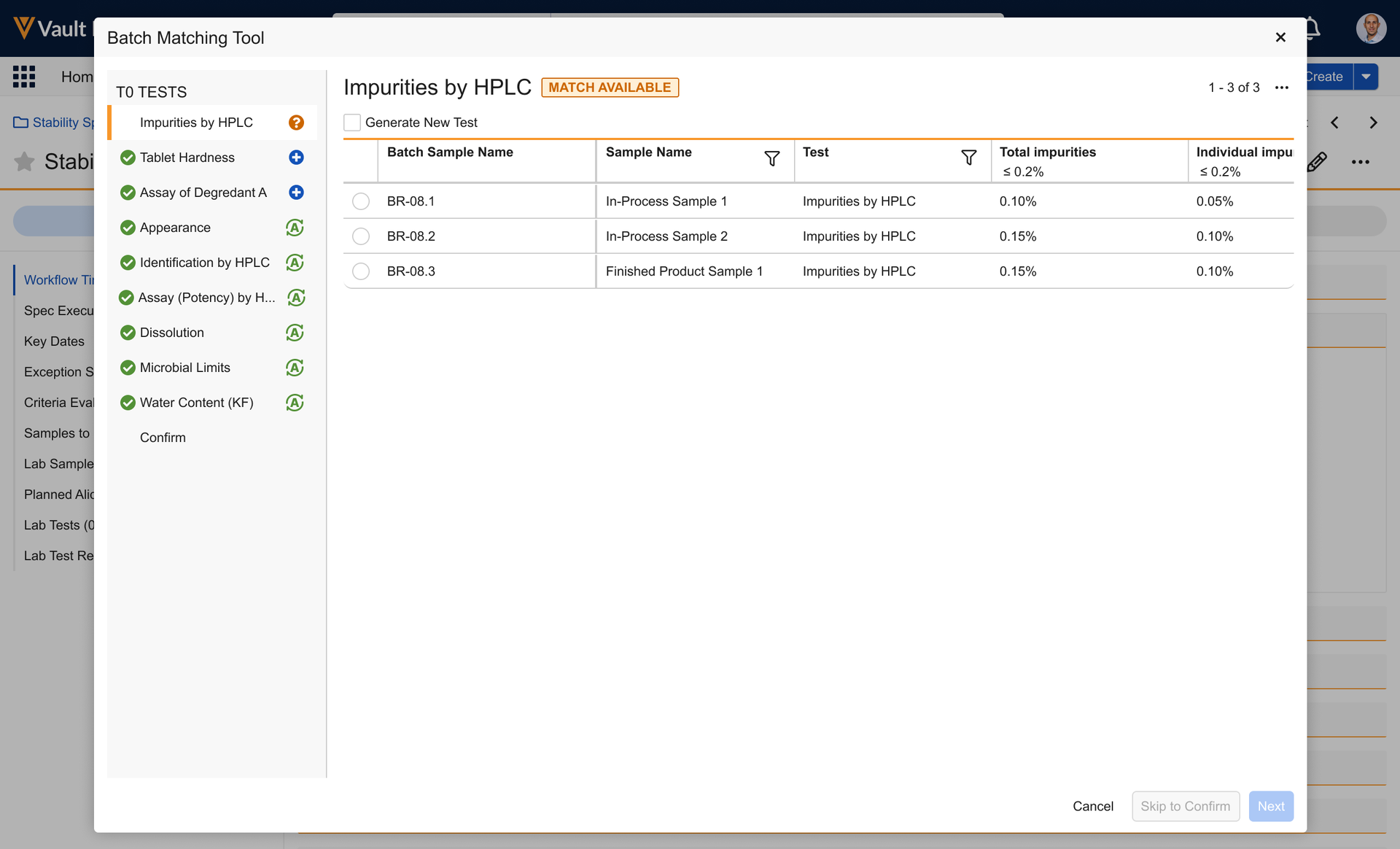
3. In the resulting dialog, review the *Tests* listed along the left side. *Tests* that are matched display a  icon and *Tests* that require decisions to be made display
  .
4. For each *Test* that requires a decision, select the **Batch Result** to be matched, then click **Next**. You can also select **Generate New Test** to use none of the listed *Batch Results*.
1. The dialog displays *Test Name*, *Lab Sample*, and *Sample Type* columns followed by columns for each result including the Stability *Test's* *Criteria* to evaluate against. You can sort these results by *Test Name*, *Lab Sample*, and *Sample Type* as well as filter them by *Lab Sample* and *Sample Type*.
5. Once you have reviewed each *Test* and made any necessary decisions, review the summary and click **Confirm**.
If two *Tests* have results that are dependent on each other, for example, one test has a result that is used as a cross-test variable in another test, the dependent tests must either all be matched, or none matched.
After matching is complete, if every *Test* is either an *Auto Match* or one for which you manually chose a match, the *Spec Execution* moves to *Testing Complete*. The criteria for any Test Result values used are evaluated. If any new *Tests* were generated, the *Spec Execution* moves to *In Progress* and you can enter the results as normal.
The system creates as few *Lab Samples* as necessary. It only creates those directly related to the T0 Test Action. Any planned parent samples or aliquots, for example, are not created.
The system also creates any dependent Tests of the Tests generated (such as those used in cross-test variables) regardless of whether they have any Out of Specification criteria, as they are needed to complete the dependent tests. When determining dependencies, the system ignores Sample scope variables.
During this process, the system ignores Auto-Generate and Auto-Match flags as well as the Prevent Sample Creation flag.
You cannot approve a *Stability Spec Execution* before approving the *Batch Release Spec Execution* from which it uses results. Additionally, you cannot re-open a *Batch Release Test* that has results being used in a *Stability Spec Execution* without first re-opening the *Stability Spec Execution*.
## Limitations
When performing the *Initiate Lab Study from Batch* action, the following limitations apply:
* The T0 Spec Data cannot exceed 50 Spec Data Test Actions of object type `spec_data_test_sample__v`.
* The T0 Spec Data cannot exceed 100 defined Criteria Evaluations.
* The Batch cannot exceed 300 Tests.
* The Batch cannot exceed 1000 Test Results.
## Related Permissions
In order to use Batch Results for Stability Timepoint Zero, you must have the LIMS User permission set and Execute permission for the *Initiate Lab Study from Batch* action.
.
4. For each *Test* that requires a decision, select the **Batch Result** to be matched, then click **Next**. You can also select **Generate New Test** to use none of the listed *Batch Results*.
1. The dialog displays *Test Name*, *Lab Sample*, and *Sample Type* columns followed by columns for each result including the Stability *Test's* *Criteria* to evaluate against. You can sort these results by *Test Name*, *Lab Sample*, and *Sample Type* as well as filter them by *Lab Sample* and *Sample Type*.
5. Once you have reviewed each *Test* and made any necessary decisions, review the summary and click **Confirm**.
If two *Tests* have results that are dependent on each other, for example, one test has a result that is used as a cross-test variable in another test, the dependent tests must either all be matched, or none matched.
After matching is complete, if every *Test* is either an *Auto Match* or one for which you manually chose a match, the *Spec Execution* moves to *Testing Complete*. The criteria for any Test Result values used are evaluated. If any new *Tests* were generated, the *Spec Execution* moves to *In Progress* and you can enter the results as normal.
The system creates as few *Lab Samples* as necessary. It only creates those directly related to the T0 Test Action. Any planned parent samples or aliquots, for example, are not created.
The system also creates any dependent Tests of the Tests generated (such as those used in cross-test variables) regardless of whether they have any Out of Specification criteria, as they are needed to complete the dependent tests. When determining dependencies, the system ignores Sample scope variables.
During this process, the system ignores Auto-Generate and Auto-Match flags as well as the Prevent Sample Creation flag.
You cannot approve a *Stability Spec Execution* before approving the *Batch Release Spec Execution* from which it uses results. Additionally, you cannot re-open a *Batch Release Test* that has results being used in a *Stability Spec Execution* without first re-opening the *Stability Spec Execution*.
## Limitations
When performing the *Initiate Lab Study from Batch* action, the following limitations apply:
* The T0 Spec Data cannot exceed 50 Spec Data Test Actions of object type `spec_data_test_sample__v`.
* The T0 Spec Data cannot exceed 100 defined Criteria Evaluations.
* The Batch cannot exceed 300 Tests.
* The Batch cannot exceed 1000 Test Results.
## Related Permissions
In order to use Batch Results for Stability Timepoint Zero, you must have the LIMS User permission set and Execute permission for the *Initiate Lab Study from Batch* action.